Introduction to Docker Containers
Oh Docker... let's get started.
Introduction to Docker containers - Learn
The problem containers solve
There's usually more than one team working on the success of your application. There's the development team that creates the application, and the operations team that take care of the deployment and management of it. Typically each team will have an environment they work in:
- Development environment.
- QA environment.
- Pre-production environment.
- Production environment.
etc.
There are some challenges that occur because of this setup:
- Different environments require different software and hardware management.
- Each deployment of our app to our environments must happen consistently.
- Each deployment must execute in such a way that it's isolated from other applications running on the same hardware to make best use of resources without compromising each other.
- Our applications must be portable.
This is where containers come in to save the day.
What is a container?
A container is a loosely isolated environment that allows us to build and run software packages. These packages (called container images) include the code and all dependencies to run applications quickly and reliably on any computing environment.
The container image becomes the unit we use to distribute our applications.
The process of deploying and running our apps with containers is called containerization.
One of the strengths of containerization is that you don't have to configure hardware and spend time installing operating systems and software to host a deployment.
Since containers are isolated from each other, they help us improve the security of our application. Multiple containers can run on the same hardware, improving the efficiency of hardware use.
What is Docker?
Docker is the most popular containerization platform. We use it to develop, ship, and run containers.
Docker Architecture
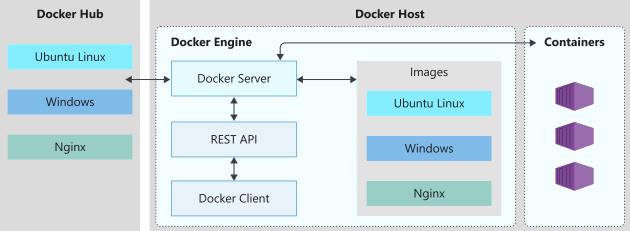
Docker Host
Docker Engine
The Docker Engine is configured as a client-server implementation where the client and server can run on the same host or on a remote one and communicate via the Docker REST API. Components making up the engine are:
- The Docker client
- It’s a command-line named
dockerused to interact with a local or remote Docker server and functions as the primary interface to manage containers.
- It’s a command-line named
- The Docker server
- A daemon named
dockerd(computer program that runs as a background process). It’s job is to respond to requests from the Docker client via the Docker Rest API, interact with other daemons, and keep track of the lifecycle our the containers.
- A daemon named
- Docker objects
- When working with Docker, you’ll create and work with images, containers, networks, plugins, and other objects.
Docker Hub
Docker Hub is a Docker container registry and it’s the default public registry Docker uses for image management. A container registry are repositories that we can use to store and distribute container images we create.
How Docker images work
What is a container image?
A container image is made up of:
- application code
- system packages
- binaries
- libraries
- configuration files
- operating system
This image, when run, becomes a container. An image is immutable, to apply changes to it you would have to create a new image.
A container image is an immutable package that contains all the application code, system packages, binaries, libraries, configuration files, and the operating system running in the container. Docker containers running on Linux share the host OS kernel and don't require a container OS as long as the binary can access the OS kernel directly.
What is the host OS?
The OS on which the Docker engine is running on is the host OS.
- Containers running on Linux share the same host OS kernel and don’t require a container OS as long as they binary can access the OS kernel directly.
- Containers running on Windows need a container OS. The container depends on the OS kernel to manage services such as the file system, network management, process scheduling, and memory management.
What is the container OS?
The container OS is the OS that is part of the container image. We can include different versions of Linux or Windows in a container and this allows us to access specific OS features.

It’s isolated from the host OS and is the environment in which we deploy and run our app. This isolation means the environment for our application running in development is the same as in production.
What is the Stackable Unification File System (Unionfs)
Unionfs: A Stackable Unification File System
Unionfs is a file system that allows you to stack several directories, called branches, in such a way that it appears as if the content is merged. It works on top of other file systems and came into existence because containers need a more efficient way to share physical memory segments than conventional file systems.
UnionFS : A File System of a Container
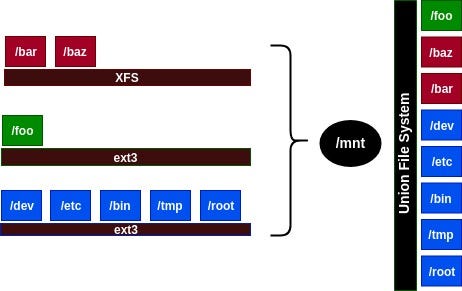
Though the content appears merged, it is kept physically separate. Unionfs allows you to add and remove branches as you build out your file system.
Base image and parent image
- Base image: an image that uses the Docker
scratchimage (empty container that doesn’t create a file system layer). This type of image assumes the app can directly use the host OS kernel.- Allow us more control over the contents of the final image.
- Parent image: an image that your image is based on.
- Most dockerfiles start from a parent image since they are already based on an OS and other components installed we would need.
What is a Dockerfile?
A Dockerfile is a text file that contains the instructions we use to build and run a Docker image. It defines:
- The base or parent image we use to create the new image.
- Commands to update the base OS and install additional software.
- Build artifacts to include (developed application, etc.).
- Services to expose (storage, network configuration, etc.).
- Command to run when the container is launched.
# Step 1: Specify the parent image for the new image FROM ubuntu:18.04Step 2: Update OS packages and install additional software
RUN apt -y update && apt install -y wget nginx software-properties-common apt-transport-https
&& wget -q https://packages.microsoft.com/config/ubuntu/18.04/packages-microsoft-prod.deb -O packages-microsoft-prod.deb
&& dpkg -i packages-microsoft-prod.deb
&& add-apt-repository universe
&& apt -y update
&& apt install -y dotnet-sdk-3.0Step 3: Configure Nginx environment
CMD service nginx start
Step 4: Configure Nginx environment
COPY ./default /etc/nginx/sites-available/default
STEP 5: Configure work directory
WORKDIR /app
STEP 6: Copy website code to container
COPY ./website/. .
STEP 7: Configure network requirements
EXPOSE 80:8080
STEP 8: Define the entry point of the process that runs in the container
ENTRYPOINT [“dotnet”, “website.dll”]
Each of these steps creates a cached container image as we build the final container image. These cached container images are layered on top of the previous and presented as a single image once all steps are complete (thanks to unionfs)
The ENTRYPOINT command indicates which process will execute once we run a container from an image.
How to manage Docker images
The Docker CLI allows us to manage images by building, listing, removing, and running them. The CLI sends all queries to the docerkd daemon.
- We use
docker buildto build Docker images. - An image tag is a text string that is used to version an image. We can tag an image by using the
-tcommand flag when building. If not specified, the image is labeled with thelatesttag. docker imagesis used to view images on a local docker registry.docker rmiis used to remove an image from the local docker registry.- You can’t remove an image if it is still in use.
How Docker containers work
How to manage Docker containers
A docker container has a lifecycle that you can manage and track the state of the container.

- Use the
runcommand to place a container in run state- A container is considered in a running state until it’s paused, stopped, or killed.
- A container can self-exit when the running process completes, or if the process goes into a fault state.
- Use the
restartcommand to restart a container- When restarting a container, it receives a termination signal to enable any running processes to shut down gracefully before the container’s kernel is terminated.
- Use the
pausecommand to a pause a running container.- This process suspends all processes in the container.
- Use the
stopcommand to stop a running container.- This command enables the working process to shut down gracefully be sending it a termination signal. The container’s kernel terminated the working process in the container.
- Use the
killcommand to send a kill signal to the container if you need to terminate it.- The running process doesn’t capture the kill signal, only the container’s kernel.
- This command will forcefully terminate the working process in the container.
- Use the
removecommand to remove a container that are in a stopped state. all data stored in the container gets destroyed.
How to view available containers
- use the
docker pscommand to list running containers.- Pass the
-aargument to see all containers in all states.
- Pass the
Why are containers given a name?
Use the --name flag to give a container an explicit name. Names are unique and enable us to run multiple container instances of the same image.
Docker container storage configuration
Always consider containers as temporary when thinking about storing data.
- Container storage is temporary
- Container storage is coupled to the underlying host machine
- Container storage divers are less performant
Containers can make use of volumes and bind mounts to persist data.
What is a volume?
- A volume is store on the host filesystem at a specific folder location and is considered the preferred data storage strategy to use with containers.
- Choose a folder that isn’t going to be modified by non-Docker processes.
- Create and manage the volume with the
docker volume createcommand. - You can create volumes as part of the container creation process (dockerfile).
- Docker will create the volume is if doesn’t exist when you try to mount the volume into a container the first time.
- After mounted, these volumes are isolated from the host machine.
- Multiple containers can simultaneously use the same volumes.
- Volumes don’t get removed when a container stops using it.
- Create and manage the volume with the
- Choose a folder that isn’t going to be modified by non-Docker processes.
What is a bind mound?
- Conceptually the same as a volume except you can mount any file or folder on the host. You’re also expecting the host can change the contents of these mounts.
- They have limited functionality compared to volumes.
- More performant.
- Depend on the host having a specific folder structure in place.
Docker container network configuration
Network configuration enables us to build and configure apps that can communicate securely with each other.
What is the bridge network?
The bridge network is the default configuration applied to containers when launched without specifying any additional network configuration.
- It’s internal, private, and isolated the container network from the Docker host network.
- Each container in the bridge network is assigned an IP address and subnet mask with the hostname defaulting to the container name.
- Containers connected to the default bridge network are allowed to access other bridge connected containers by IP address and not by hostnames.
- To enable port mapping between the container ports and the docker host ports, use the Docker port
--publishflag. This effectively configures a firewall rule that maps the ports. - the Docker0 network interface isn't available on macOS when using the bridge network
Host network
The host network enables you to run the container on the host network directly. This effectively removes the isolation between the host and the container at a network level.
The container can use only ports not already used by the host.
host network configuration isn't supported for both Windows and macOS desktops.
None network
To disabled networking for containers, use the none network option.
When to use Docker containers
- Efficient use of hardware.
- By removing the VM and the additional OS requirement, we can free resources on the host and use it for running other containers.
- Container isolation.
- Docker containers provide security features to run multiple containers simultaneously on the same host without affecting each other
- Application portability
- With Docker, the container becomes the unit we use to distribute applications. This concept ensures that we have a standardized container format.
- Management of hosting environments
- We configure our application's environment internally to the container. This containment provides flexibility for our operations team to manage the application's environment much closer.
- Cloud deployments
- Docker containers are the default container architecture used in the Azure containerization services and are supported on many other cloud platforms.
When not to use Docker containers?
- Security and virtualization
- Containers share a single host OS kernel, which can be a single point of attack.
- Service monitoring
- Managing the applications and containers are more complicated than traditional VM deployments. Logging features exist that tell us about the state of the running containers. However, more detailed information about services inside the container is harder to monitor.